Shelly mobile app

Shelly Smart Control

One app to control everything. Completely FREE.

Available on:

A smartphone screen displays a home automation app interface, showing control options for the bedroom and living room, against a light blue gradient background.

Always know what is happening at your home or business with the Shelly Smart Control App!

Energy data in real-time & detailed reports
Remote Control of all devices
Notifications in real-time
Scene creation for easy automation

Everything at home connected


Control your Shelly devices from anywhere with the Shelly Smart Control app. Now featuring a fresh design, improved navigation, and enhanced energy monitoring for seamless smart home management.

Enhanced automation and control


Shelly Smart Control App will help you control your Shelly devices remotely and will send notifications for all automated events in your home. You can easily configure devices and manage their settings individually, or you can create personalized scenes by combining Shelly devices to trigger certain actions in your home automation.

Improve your energy efficiency


Save on electricity bills by improving the overall power usage of your household or office. Shelly Smart Control App supports real-time power metering and allows you to build complex automation solutions for improved energy and operational efficiency.
A smartphone displays a forest wallpaper and a notification. Surrounding the phone, icons and labels highlight features: custom schedules, smart timers, real-time notifications, personalized scenes, energy monitoring, and remote control.
A person lies in bed in a dimly lit bedroom as sunlight streams in through open blinds. Text reads: Shelly will wake you up with a beautiful sunrise and 07:00 AM ~ Morning scene, Bedroom blinds – Open.
A smartphone displays a home design app interface, showing different rooms like the living room, kitchen, garden, and bedroom, with floating room cards above the phone on a blue circular background.

Everything at home connected


Control your Shelly devices from anywhere with the Shelly Smart Control app. Now featuring a fresh design, improved navigation, and enhanced energy monitoring for seamless smart home management.
A person lies in bed in a dimly lit bedroom as sunlight streams in through open blinds. Text reads: Shelly will wake you up with a beautiful sunrise and 07:00 AM ~ Morning scene, Bedroom blinds – Open.

Enhanced automation and control


Shelly Smart Control App will help you control your Shelly devices remotely and will send notifications for all automated events in your home. You can easily configure devices and manage their settings individually, or you can create personalized scenes by combining Shelly devices to trigger certain actions in your home automation.
A smartphone displays a forest wallpaper and a notification. Surrounding the phone, icons and labels highlight features: custom schedules, smart timers, real-time notifications, personalized scenes, energy monitoring, and remote control.

Improve your energy efficiency


Save on electricity bills by improving the overall power usage of your household or office. Shelly Smart Control App supports real-time power metering and allows you to build complex automation solutions for improved energy and operational efficiency.

Control Your Home, Anytime, Anywhere.

FEATURES

Endless features

Smartphone displaying a home automation app’s “Living room” screen, showing controls for a smart bulb (on, 60.76W, 50%), blinds (open), and other devices, with navigation tabs at the top and bottom.
Easy inclusion and control

Include your Shelly devices in the Shelly Smart Control app, name them, and assign them to the rooms they belong to. Turn on/off or Dim the lights, open and close the blinds, monitor the power consumption of the washing machine and kitchen appliances, or check the garage door... you name it. Now a simple tap on the screen is enough to control all connected devices in your home.

A smartphone displays a home automation app dashboard showing controls for blinds, lighting, bedroom temperature, underfloor heating, main entrance, and kitchen, with icons, on/off buttons, and temperature readings.
Custom dashboard

The new Shelly Smart Control app allows for more convenient control of your home and facilities. Create multiple dashboards for quick access to your preferred devices, rooms, and scenes. You will be able to control the devices in each of your dashboards as a group or individually.

A smartphone screen displays an energy consumption app showing a gauge with total current consumption of 4.62 kWh, and a bar chart of consumption by appliance type: Unknown, Router, Lighting, and Entertainment.
Monitor your consumption

A newly developed consumption panel gives you a detailed view of your overall and current energy usage, along with your consumption by appliance type or individual device. The information is stored in a free cloud and fully accessible to you for further analysis of your energy consumption habits and possible savings in each of your facilities.

A smartphone displays the Shelly apps Electricity Tariff screen, showing options to set billing date, preferred currency, default tariff rate, and buttons for saving preferences and adding tariffs.
Stay on top of your electricity bills

Know your approximate spending on electricity, using the functionality to follow your region's day and night tariff, and schedule your appliances accordingly to reduce your monthly bills.

A smartphone screen displays the Shelly app with lighting scenes: Romantic night, Living room - Soft lighting, and Kids room - Good night, each with preview images and play buttons on the right.
Smart scenes

Get creative by combining multiple devices into one smart scene with pre-set sequentially triggered actions for a single purpose. Are you in the mood for "Movie night"? Or have a favorite "Morning routine"? Use the Shelly Smart Control app to set up the scene and enjoy as it unfolds.

A smartphone screen displays a scheduling app with options to create a schedule. The mode selection is set to Simple and all weekdays (Monday to Sunday) are selected. A blue Next button is shown at the bottom.
Custom schedules & timers

Teach your home how to interact with you best by setting custom schedules based on your agenda. You can set Shelly Plus 1 to turn on the garage alley lights at 7:00 PM on workdays, or set Shelly TRV to increase the temperature in the house an hour before you come back from work, making sure that your home is cozy and welcoming by your arrival.

A smartphone screen displays the Shelly app interface, showing controls for smart home devices like lights and scenes, with on/off buttons and labeled groups such as All lights, Bye bye, and Not often used.
Group devices

Define custom "Groups" where you can combine multiple devices and control them simultaneously using the app or your preferred voice assistant.

A smartphone screen displays the Shelly app with a notification confirming that the users account is linked with Amazon Alexa, providing example voice commands and a disable button.
"Talks" with Alexa

Shelly Smart Control is natively compatible with Amazon Alexa! Straight from the app settings, you can enable the "Shelly" skill in Alexa and effortlessly add your devices to control them by just using your voice
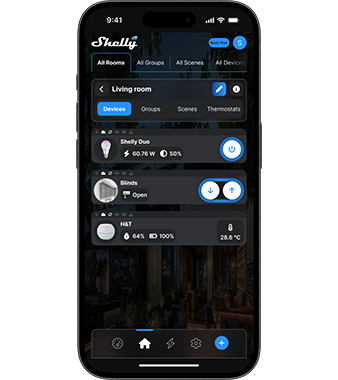
Smartphone displaying a home automation app’s “Living room” screen, showing controls for a smart bulb (on, 60.76W, 50%), blinds (open), and other devices, with navigation tabs at the top and bottom.
Easy inclusion and control

Include your Shelly devices in the Shelly Smart Control app, name them, and assign them to the rooms they belong to. Turn on/off or Dim the lights, open and close the blinds, monitor the power consumption of the washing machine and kitchen appliances, or check the garage door... you name it. Now a simple tap on the screen is enough to control all connected devices in your home.
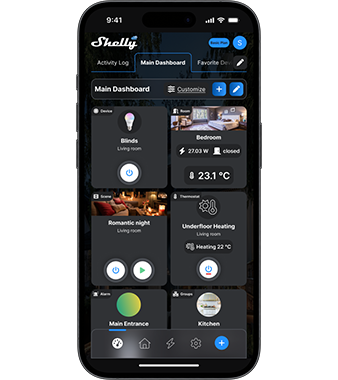
A smartphone displays a home automation app dashboard showing controls for blinds, lighting, bedroom temperature, underfloor heating, main entrance, and kitchen, with icons, on/off buttons, and temperature readings.
Custom dashboard

The new Shelly Smart Control app allows for more convenient control of your home and facilities. Create multiple dashboards for quick access to your preferred devices, rooms, and scenes. You will be able to control the devices in each of your dashboards as a group or individually.
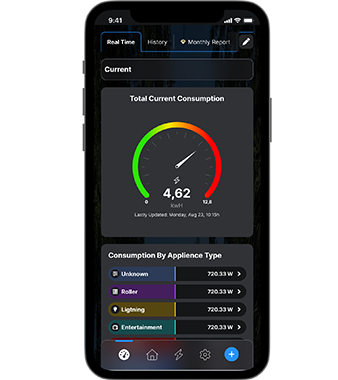
A smartphone screen displays an energy consumption app showing a gauge with total current consumption of 4.62 kWh, and a bar chart of consumption by appliance type: Unknown, Router, Lighting, and Entertainment.
Monitor your consumption

A newly developed consumption panel gives you a detailed view of your overall and current energy usage, along with your consumption by appliance type or individual device. The information is stored in a free cloud and fully accessible to you for further analysis of your energy consumption habits and possible savings in each of your facilities.
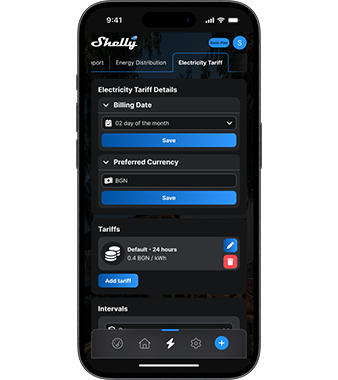
A smartphone displays the Shelly apps Electricity Tariff screen, showing options to set billing date, preferred currency, default tariff rate, and buttons for saving preferences and adding tariffs.
Stay on top of your electricity bills

Know your approximate spending on electricity, using the functionality to follow your region's day and night tariff, and schedule your appliances accordingly to reduce your monthly bills.
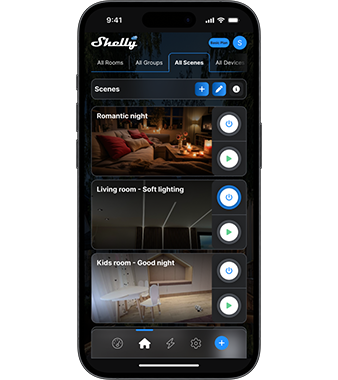
A smartphone screen displays the Shelly app with lighting scenes: Romantic night, Living room - Soft lighting, and Kids room - Good night, each with preview images and play buttons on the right.
Smart scenes

Get creative by combining multiple devices into one smart scene with pre-set sequentially triggered actions for a single purpose. Are you in the mood for "Movie night"? Or have a favorite "Morning routine"? Use the Shelly Smart Control app to set up the scene and enjoy as it unfolds.
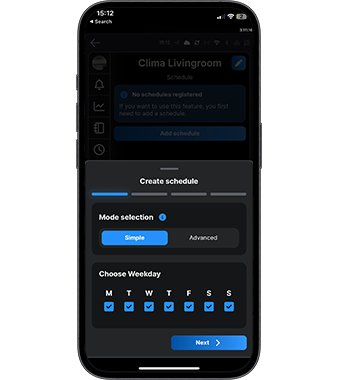
A smartphone screen displays a scheduling app with options to create a schedule. The mode selection is set to Simple and all weekdays (Monday to Sunday) are selected. A blue Next button is shown at the bottom.
Custom schedules & timers

Teach your home how to interact with you best by setting custom schedules based on your agenda. You can set Shelly Plus 1 to turn on the garage alley lights at 7:00 PM on workdays, or set Shelly TRV to increase the temperature in the house an hour before you come back from work, making sure that your home is cozy and welcoming by your arrival.
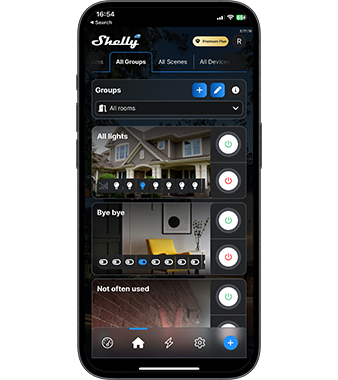
A smartphone screen displays the Shelly app interface, showing controls for smart home devices like lights and scenes, with on/off buttons and labeled groups such as All lights, Bye bye, and Not often used.
Group devices

Define custom "Groups" where you can combine multiple devices and control them simultaneously using the app or your preferred voice assistant.
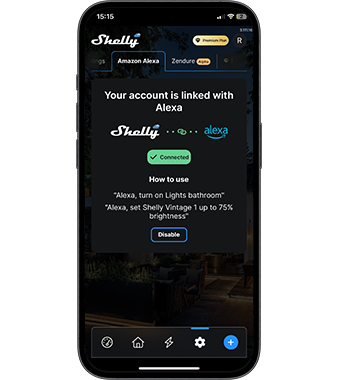
A smartphone screen displays the Shelly app with a notification confirming that the users account is linked with Amazon Alexa, providing example voice commands and a disable button.
"Talks" with Alexa

Shelly Smart Control is natively compatible with Amazon Alexa! Straight from the app settings, you can enable the "Shelly" skill in Alexa and effortlessly add your devices to control them by just using your voice

Control Your Home, Anytime, Anywhere.

A laptop and smartphone display a smart home control dashboard, showing live room camera feeds, energy statistics, device settings, and weather information.
SHELLY APP

Control Your Devices from Anywhere!

Manage your Shelly devices from anywhere using the free Shelly Smart Control app. Enjoy a sleek new design, improved navigation, and enhanced energy monitoring for effortless smart home management.